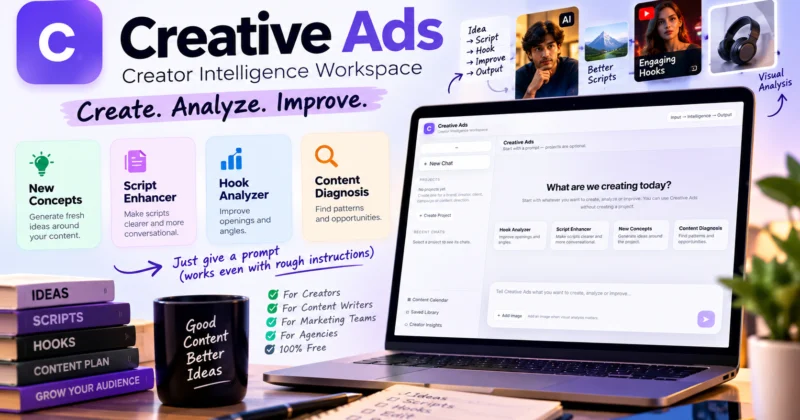
Creative Ads: Free AI Content Creation Tool for Creators and Content Teams
Creative Ads is a free AI-assisted content workspace built for people who create, analyze or improve content. Instead of forcing users through a complicated interface, it starts with a simple idea: tell the AI what you want to create, analyze or improve, then work with the output.
The basic philosophy is simple:
You can start with a prompt, use one of the available creative workflows, add an image when visual context matters, or organize your work inside a project.
But there is an important lesson behind using any AI content tool: you do not need perfect prompts, but better instructions usually give you better control over the output.
This guide explains what Creative Ads is, who it is for, how its main workflows work, and how to get better results from simple natural-language instructions.
What Is Creative Ads?
Creative Ads is a Creator Intelligence Workspace designed around content creation and improvement.
Rather than requiring users to learn a complicated sequence of menus before they can begin, the workspace starts with a simple question:
“What are we creating today?”
You can tell Creative Ads what you want to create, analyze or improve directly through the prompt interface.
You can also work without creating a project. Projects are optional and can be used when you want to organize work around a brand, creator, client, campaign or content direction.
This makes the tool useful for both quick one-off tasks and more organized content workflows.
Who Is Creative Ads For?
Creative Ads is designed around people whose work involves producing or improving content.
Content Creators
YouTube creators, Instagram creators, short-form video creators and other creators can use AI assistance for ideas, hooks, scripts and content improvement.
Content Writers
If your job involves writing articles, scripts, captions, concepts or other content, Creative Ads can become an AI-assisted part of your writing workflow.
Social Media Professionals
Social-media work often requires a constant flow of ideas, hooks, scripts and creative variations. AI can help accelerate parts of that process.
Marketing Teams
People working inside organizations may need to create and refine content as part of their daily responsibilities. Creative Ads can be used as an additional intelligence layer during that process.
Freelancers and Agencies
Freelancers and agencies can organize work around individual clients, campaigns or content directions using projects.
The important point is that Creative Ads is not limited to one type of creator. Its underlying use case is broader:
If creating, analyzing or improving content is part of your work, an AI-assisted workspace can help you move through that work faster.
Why Is the Creative Ads Interface So Simple?
Many AI products can become complicated because they expose a large number of settings, tools and workflows.
Creative Ads takes a different approach.
The main interaction is simply to describe what you want.
You can start with:
- A rough idea
- An existing piece of content
- A question
- A script that needs improvement
- A hook that feels weak
- A topic that needs new concepts
- An image that needs visual analysis
The goal is not to make you operate complicated software. The goal is to let you communicate the creative problem you are trying to solve.
This is why the product can be understood through three simple stages:
Input
What you give the AI.
Intelligence
The AI interprets the request and works on the task.
Output
The result you review, refine and use.
You Don’t Need Perfect Prompts
One of the biggest misconceptions around AI content creation is that you need to become an expert prompt engineer before you can get useful results.
You don’t.
AI systems can understand normal human instructions, including instructions that are short, informal or imperfect.
For example:
is still understandable.
But if you want more control over the result, you can provide additional context:
The second instruction gives the AI more information about the desired outcome.
That leads to a useful principle:
This does not mean every long prompt produces a better result. The goal is to provide the right context, not simply more words.
How to Give Better Instructions to AI
You can make most content requests clearer by thinking about six simple elements.
1. What do you want?
Tell the AI what you actually want created or changed.
For example:
“Write a Reel script.”
2. Who is it for?
Give the target audience.
For example:
“The audience is Indian college students.”
3. What is the goal?
Explain what the content should accomplish.
For example:
“The goal is to create curiosity and encourage viewers to watch until the end.”
4. What context matters?
Give the information the AI needs to understand the situation.
5. What style do you want?
Specify whether the content should be conversational, professional, educational, humorous, direct or another style.
6. What constraints should it follow?
Include important requirements such as length, platform, language, structure or things to avoid.
Put together, the framework becomes:
Creative Ads Feature #1: Hook Analyzer
A strong opening can determine whether someone continues watching or reading your content.
Creative Ads includes a Hook Analyzer designed to improve openings and angles.
This can be useful for:
- YouTube openings
- Instagram Reel hooks
- Short-form video openings
- Content introductions
- Marketing concepts
- Advertisement openings
A basic workflow could look like:
Existing hook → Analyze → Identify weaknesses → Create alternatives → Select and refine
For example, instead of immediately asking AI to generate ten random hooks, you can give it an existing hook and ask it to identify what could make the opening stronger.
This turns AI from a simple generation tool into an assistant for creative evaluation.
Creative Ads Feature #2: Script Enhancer
Sometimes you already have the idea and even the complete script, but the writing does not sound natural.
The Script Enhancer is designed to make scripts clearer and more conversational.
This can be useful when a script feels:
- Too formal
- Robotic
- Repetitive
- Unclear
- Too long
- Weak between sections
Instead of throwing away your original work, you can use AI to refine it.
A practical workflow is:
Your idea → Your draft → AI-assisted refinement → Human editing → Final script
This is an important distinction. AI does not have to create everything from zero. It can also improve something you have already created.
Creative Ads Feature #3: New Concepts
Content creators frequently face a simple problem:
“What should I create next?”
The New Concepts workflow is designed to generate ideas around a project.
Instead of asking:
“Give me content ideas.”
you can provide more useful context:
- Topic
- Audience
- Platform
- Content objective
- Brand or creator direction
- Style
The more relevant context you provide, the easier it becomes to evaluate whether an idea actually fits your content strategy.
Remember that idea generation is only the beginning.
The creator still decides which idea is worth producing.
Creative Ads Feature #4: Content Diagnosis
Creating more content is not always the answer.
Sometimes you need to understand what is already happening in your content.
Creative Ads includes Content Diagnosis, which is designed to find patterns and opportunities.
This creates a different kind of AI workflow:
Existing content → Analysis → Patterns → Opportunities → Better content decisions
Instead of continuously asking AI to generate another piece of content, you can use intelligence to understand where your existing content may have room for improvement or new directions.
Use Images When Visual Context Matters
Some creative tasks cannot be properly explained through text alone.
Creative Ads includes an Add Image option for situations where visual analysis matters.
For example, a creator may want to provide visual context alongside an instruction rather than trying to describe everything manually.
The basic interaction becomes:
This can be particularly useful when the task involves an existing creative or another visual reference.
Projects: Organize Work Around a Brand, Creator or Client
Creative Ads can be used without creating a project, but projects become useful when your work needs organization.
The current workspace allows a project to be created around:
- A brand
- A creator
- A client
- A campaign
- A content direction
Instead of treating every AI interaction as a completely separate task, you can organize related work around one project.
For example:
↓
Content Direction
↓
Hooks
↓
Scripts
↓
Concepts
↓
Content Improvements
This is particularly relevant for freelancers, agencies and employees who work on multiple brands or content directions.
Creative Ads for YouTube and Short-Form Creators
Creators can use an AI-assisted workflow across different stages of content production.
Before creating content
- Generate concepts
- Explore different angles
- Develop hooks
While creating content
- Improve scripts
- Refine openings
- Develop alternative approaches
After creating content
- Analyze existing content
- Find patterns
- Identify opportunities
- Improve future content decisions
This creates a broader workflow than simply asking AI to “write a script.”
Creative Ads for Content Writers
Content writers can also use AI at different stages of their workflow.
For example:
Topic → Ideas → Structure → Draft → Improvement → Review → Final content
AI can assist with parts of this process, while the writer remains responsible for accuracy, originality, tone and final editorial decisions.
If you are interested in the broader economics of using AI in professional work, see our guide:
How to Make Money Using AI: Complete Beginner’s Guide
Creative Ads for Marketing and Content Teams
Content production inside an organization can involve many repetitive tasks.
A marketing employee may need to:
- Develop content ideas
- Write scripts
- Improve existing copy
- Develop campaign angles
- Create variations
- Review content
- Maintain a consistent content direction
An AI workspace can become part of that workflow without requiring the employee to replace their existing process completely.
The useful approach is:
Existing professional skill + AI assistance = faster content workflow
Creative Ads for Freelancers and Agencies
Freelancers and agencies often manage multiple clients, which makes organization especially important.
Projects can provide a structure around individual clients or campaigns.
For example:
- Client A → Social media content
- Client B → YouTube scripts
- Client C → Product campaign
- Client D → Brand content
Each project can have its own content direction rather than forcing every task into one generic conversation.
Broken Prompts Can Still Work
You do not always have to write polished instructions.
Consider this:
It is not perfectly structured, but the intent is understandable.
You can then continue refining the result:
- “Make the hook stronger.”
- “Make it more conversational.”
- “Give me three alternatives.”
- “Remove the sales tone.”
- “Make it shorter.”
This is one of the most practical ways to work with AI.
You do not necessarily need to produce the perfect instruction on the first attempt.
Instead, treat the conversation as an iterative creative process.
Rough Instruction vs Better Instruction
| Rough instruction | More controlled instruction |
|---|---|
| Make this hook better. | Make this hook more curiosity-driven for an Instagram Reel aimed at college students. |
| Give me content ideas. | Give me 10 short-form content concepts for Indian students interested in online earning. |
| Improve this script. | Make this 25-second script more conversational and remove unnecessary repetition. |
| Analyze my content. | Analyze these content ideas and identify repetitive topics and opportunities for new angles. |
| Make it professional. | Rewrite this for a professional marketing audience while keeping the language simple and direct. |
The point is not to make prompts unnecessarily long.
The point is to give AI enough information to understand what a successful output looks like.
AI Output Is Not Automatically Final Content
This is one of the most important principles when using AI professionally.
The workflow should not be:
Prompt → AI output → Publish
A better workflow is:
The creator or professional should still decide:
- Whether the idea is useful
- Whether the information is accurate
- Whether the tone is appropriate
- Whether the content fits the audience
- Whether claims need verification
- Whether the final content represents the brand correctly
AI can accelerate the process, but it does not remove the need for editorial judgment.
How to Build a Better AI Content Workflow
If you want to use Creative Ads effectively, start with the problem rather than the tool.
Step 1: Define what you need
Do you need an idea, hook, script improvement, content analysis or something else?
Step 2: Give useful context
Tell the AI who the content is for and what you want it to achieve.
Step 3: Start with a simple instruction
Do not waste time trying to write an enormous prompt if a short instruction communicates the task.
Step 4: Review the output
Look for mistakes, weak ideas, irrelevant information or the wrong tone.
Step 5: Refine
Tell the AI exactly what needs to change.
Step 6: Apply human judgment
Make the final editorial decision yourself.
Creative Ads Is Part of a Bigger AI Workflow
Creative Ads should not be viewed as a replacement for every other tool you use.
Different tools can perform different parts of a workflow.
For example:
Research tool → Creative Ads → Design tool → Video editor → Publishing platform
Creative Ads can occupy the creative intelligence layer between the initial idea and the final production process.
For a broader explanation of how AI tools can become useful professional workflows, read:
How to Make Money Using AI Tools: Complete 2026 Guide
Common Mistakes When Using AI Content Tools
1. Giving no context
“Make something good” gives the AI very little information about what success means.
2. Trying to make one prompt do everything
Breaking a complicated task into smaller instructions can make refinement easier.
3. Treating the first output as final
The first result is often a starting point rather than the finished creative.
4. Adding unnecessary instructions
More words do not automatically mean better results. Relevant information matters more than prompt length.
5. Forgetting the audience
Content should be created for someone. Tell the AI who that person is when the audience affects the output.
6. Publishing without review
AI-assisted content should still go through human review before important content is published.
7. Focusing on the prompt instead of the result
The purpose of prompting is not to write impressive instructions.
The purpose is to get a useful result.
A Simple Creative Ads Workflow You Can Try Today
If you are using Creative Ads for the first time, you can start with this process:
-
Choose something you are already working on.
Use an existing script, idea, hook or content topic. -
Tell Creative Ads what you want.
Start with a simple natural-language instruction. -
Add context.
Mention the audience, platform, objective or style if they matter. -
Review the result.
Do not immediately accept everything. -
Give a refinement instruction.
Tell the AI what should change. -
Repeat if necessary.
AI interaction can be iterative. -
Apply your own judgment.
Edit, verify and finalize the content.
Is Creative Ads Right for You?
Creative Ads may be useful if you:
- Create content regularly
- Write scripts or hooks
- Need new content concepts
- Frequently rewrite or improve drafts
- Work with clients or brands
- Work in a marketing or content role
- Want an AI-assisted creative workflow
- Prefer a simple prompt-based interface
It is important to understand what the tool is designed to do.
Creative Ads is an AI-assisted content workspace. It is not intended to replace every specialized tool involved in professional content production.
You may still need separate tools for tasks such as advanced video editing, graphic design, publishing, analytics or other specialized production work.
Frequently Asked Questions
Is Creative Ads free?
Yes. Creative Ads is designed as a free AI-assisted workspace for creators and content professionals.
Do I need to know prompt engineering?
No. You can use natural-language instructions. You do not need to learn complicated prompt syntax to start using the tool.
Can Creative Ads understand imperfect prompts?
It is designed to work with normal natural-language instructions, including rough instructions. However, clearer context generally gives you more control over the desired result.
Who can use Creative Ads?
Creators, content writers, social-media professionals, marketing employees, freelancers, agencies and others who regularly create, analyze or improve content can use it.
Can I use Creative Ads without creating a project?
Yes. Projects are optional. You can start directly with a prompt and use the workspace without creating a project.
What is the Hook Analyzer?
Hook Analyzer is a workflow designed to help improve openings and creative angles.
What is Script Enhancer?
Script Enhancer is designed to make scripts clearer and more conversational.
What is New Concepts?
New Concepts helps generate content ideas around a project or creative direction.
What is Content Diagnosis?
Content Diagnosis is designed to find patterns and opportunities in content.
Can I add an image?
Yes. Creative Ads includes an Add Image option for situations where visual analysis is relevant to the task.
Does AI-generated content need human review?
Yes. AI output should be reviewed before important content is published. Human judgment remains important for accuracy, relevance, originality, tone and brand suitability.
Explore Creative Ads
If you regularly create or improve content, you can try Creative Ads directly:
Try Creative Ads — Free AI Content Workspace
Related Guides
-
How to Make Money Using AI: Complete Beginner’s Guide
-
How to Make Money Using AI Tools: Complete 2026 Guide
-
Best Free AI Tools to Make Money Online
-
How to Make Money Online Using AI
Final Takeaway
You do not need to become an expert prompt engineer to get useful results from AI.
You need to communicate what you want, provide the context that matters, review the result and refine it when necessary.
That is the basic idea behind Creative Ads:
But the professional workflow goes one step further:
Whether you are a creator, content writer, marketer, freelancer or part of an organization, the value of an AI content tool is not simply how impressive its output looks.
The real value is how effectively it helps you turn your ideas and instructions into useful work.