AI Tools for Online Business: CRM, Lead Generation, Content, Automation & More
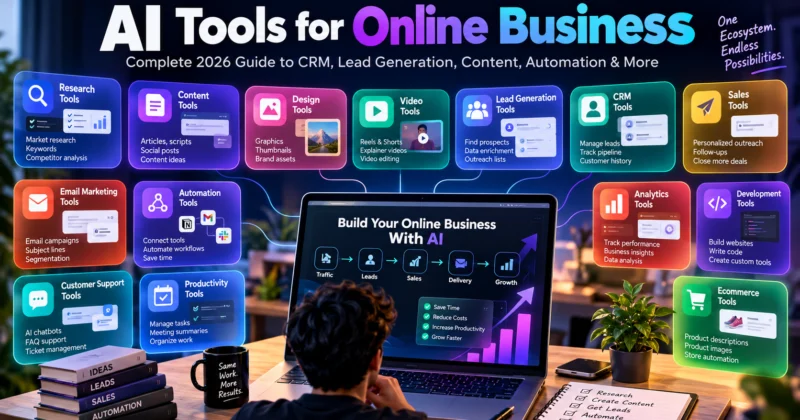
AI tools are no longer limited to writing emails or generating blog posts. An online business can use AI-assisted software across research, content creation, design, lead generation, customer relationship management, sales, customer support, automation, analytics, development and ecommerce.
The important question is not:
“Which AI tool should I use?”
A better question is:
“Which part of my business needs to become faster, easier or more efficient?”
Once you identify that problem, you can choose the appropriate type of AI tool.
This guide maps the major AI tool categories used across online businesses so you can understand what each category does, where it fits and when it makes sense to explore a dedicated tool.
What Are AI Tools for Online Business?
AI business tools are software products that use artificial intelligence to assist with specific business tasks.
Some help generate content. Others analyze information, find prospects, manage customer relationships, automate repetitive workflows or help teams understand business data.
They can be used by:
- Solo entrepreneurs
- Freelancers
- Creators
- Small businesses
- Marketing teams
- Agencies
- Ecommerce businesses
- Startups
- Larger organizations
The important distinction is that AI is a capability, not a business model by itself.
A tool becomes commercially useful when it helps you produce a valuable result or improve an important business process.
The AI Online Business Stack
An online business can be viewed as a sequence of functions:
Different AI tool categories can support different parts of that system.
| Business Function | AI Tool Category | Typical Use |
|---|---|---|
| Research | AI research tools | Market, competitor and customer research |
| Content | AI content tools | Articles, scripts, posts and ideas |
| Design | AI design tools | Graphics, creatives and visual concepts |
| Video | AI video tools | Short videos, editing and production |
| Lead Generation | AI lead-generation tools | Prospect discovery and qualification |
| CRM | AI CRM tools | Lead and customer management |
| Sales | AI sales tools | Outreach, follow-ups and sales assistance |
| Customer Support | AI support tools | Questions, tickets and support workflows |
| Email Marketing | AI email tools | Campaigns, personalization and optimization |
| Automation | AI automation tools | Connecting repetitive business processes |
| Productivity | AI productivity tools | Tasks, meetings and organization |
| Analytics | AI analytics tools | Business data and performance analysis |
| Development | AI coding tools | Websites, software and technical work |
| Ecommerce | AI ecommerce tools | Products, stores, marketing and support |
These categories should not be treated as a checklist of subscriptions. Most businesses only need a small number of tools that solve their actual problems.
1. AI Research Tools
Research is one of the first places where AI can become useful in an online business.
Before creating a product, service or marketing campaign, you may need to understand the market, competitors, customers or a particular topic.
Common research use cases
- Market research
- Competitor research
- Customer research
- Content research
- Product research
- Topic research
- Research summaries
A basic research workflow can look like:
Question → Research → Sources → Organization → Analysis → Human verification
AI can accelerate the research process, but important facts should still be checked against reliable sources.
For a deeper look at using AI as part of an income-generating workflow, read our guide to making money using AI.
2. AI Content Creation Tools
Content is one of the most visible uses of AI.
Businesses can use AI-assisted tools for:
- Blog ideas
- Article outlines
- Social media posts
- Video scripts
- Hooks
- Captions
- Content repurposing
- Content improvement
- Content analysis
But professional content should not become:
Prompt → Copy → Publish.
A stronger workflow is:
Research → AI assistance → Human editing → Fact checking → Final content
For a practical example, see Creative Ads, our free AI content workspace for creators and content teams.
3. AI Design and Creative Tools
Visual content is another major business function where AI can assist.
Depending on the tool, businesses and creators can use AI-assisted design workflows for:
- Social media graphics
- Marketing creatives
- Presentation visuals
- Thumbnail concepts
- Product visuals
- Image generation
- Creative variations
- Brand content
The key is to treat AI-generated visuals as part of a design workflow rather than assuming every generated image is automatically a finished commercial asset.
Brand consistency, composition, licensing, accuracy and human review still matter.
4. AI Video Tools
Video production can involve many individual tasks, including scripting, visual development, editing, voice generation and captioning.
AI tools can assist with parts of that process.
Common applications
- Short-form video creation
- Video scripts
- Visual concepts
- AI-generated footage
- Voice generation
- Captions
- Video repurposing
- Editing assistance
A useful commercial workflow might be:
Topic → Script → Visuals → Voice → Editing → Review → Publish
The exact tools required depend on the type of video being produced.
5. AI Lead Generation Tools
Lead generation is the process of finding potential customers who may have a need for your product or service.
This is an important distinction from content generation.
Content helps attract or educate an audience. Lead-generation systems are focused on identifying potential customers.
AI can assist with tasks such as:
- Finding potential prospects
- Researching companies
- Identifying relevant contacts
- Organizing prospect information
- Lead qualification
- Data enrichment
- Personalizing outreach
A basic lead-generation workflow can look like:
AI can help reduce the manual work involved, but lead quality still matters more than simply collecting a large number of contacts.
6. AI CRM Tools
A CRM, or Customer Relationship Management system, helps a business manage leads, prospects and customers.
Lead generation and CRM are related, but they are not the same thing.
Lead generation asks:
“Who could become a customer?”
CRM asks:
“What is happening with the people already in our sales or customer pipeline?”
AI-assisted CRM features can include:
- Lead organization
- Lead scoring
- Contact summaries
- Follow-up assistance
- Sales pipeline management
- Email assistance
- Customer history
- Task recommendations
For a small business, the workflow could look like:
New Lead → CRM → Qualification → Follow-up → Sales → Customer
The CRM becomes the central record of the relationship rather than simply another AI writing tool.
7. AI Sales and Outreach Tools
Once potential customers have been identified, the next challenge is communicating with them effectively.
AI sales and outreach tools can assist with parts of the sales process.
- Prospect research
- Personalized outreach
- Email drafting
- Follow-up assistance
- Sales conversation summaries
- Lead prioritization
- Sales workflow assistance
A simplified workflow is:
Prospect → Research → Personalized Outreach → Follow-up → Meeting → Sale
AI should assist personalization rather than turning outreach into identical mass messages.
8. AI Customer Support Tools
Customer support is another area where AI can assist businesses.
Depending on the system, AI can help with:
- Frequently asked questions
- Website chat
- Support response drafts
- Ticket categorization
- Knowledge-base search
- Support routing
- Conversation summaries
The objective should not simply be to make support “automatic.”
The objective is to help customers get useful answers while routing situations that require human judgment to the appropriate person.
9. AI Email Marketing Tools
Email marketing remains an important online-business function, and AI can assist at multiple points in the process.
Possible use cases
- Subject-line ideas
- Email drafting
- Content variations
- Audience segmentation assistance
- Personalization
- Campaign ideas
- Performance analysis
The basic process is:
Audience → Message → Campaign → Send → Measure → Improve
AI can assist with generating and analyzing parts of this process, while the business remains responsible for its messaging, audience permissions and marketing practices.
10. AI Automation Tools
Automation is one of the most useful categories because it can connect multiple business systems.
Traditional automation often looks like:
Trigger → Fixed Action
For example:
New form submission → Add row to spreadsheet
AI-assisted automation can introduce interpretation into the workflow:
Trigger → AI interpretation → Decision → Action
For example:
↓
AI identifies lead type
↓
Lead enters appropriate CRM category
↓
Sales notification is created
↓
Follow-up task is assigned
AI is particularly useful when the workflow needs interpretation rather than simply repeating the same fixed action.
For a broader explanation of turning AI capabilities into workflows, read How to Make Money Using AI Tools.
11. AI Productivity Tools
Not every AI tool directly interacts with customers.
Some are designed to improve the way a person or team works internally.
Common applications include:
- Task management
- Meeting summaries
- Note organization
- Document assistance
- Planning
- Information retrieval
- Writing assistance
- Internal knowledge management
These tools can be particularly useful when employees spend significant time organizing information instead of performing higher-value work.
12. AI Analytics and Data Tools
Businesses generate data through websites, advertising, sales, ecommerce stores, CRM systems and other platforms.
AI can help people interpret that information.
Possible use cases include:
- Spreadsheet analysis
- Sales reporting
- Marketing analysis
- Customer feedback analysis
- Performance summaries
- Trend identification
- Business reporting
A useful workflow is:
Business Data → Analysis → Insight → Decision → Action
The goal is not simply to produce another dashboard. The useful outcome is a better-informed business decision.
13. AI Coding and Website Tools
AI-assisted development has created another major category of business tools.
Developers and technical users can use AI assistance for tasks such as:
- Writing code
- Explaining code
- Debugging
- Refactoring
- Website development
- Landing pages
- Automation scripts
- Prototyping
- Internal business tools
The important limitation is that generated code still needs testing.
Security, dependencies, functionality, performance and compatibility should be reviewed before deploying software to customers or production systems.
14. AI Ecommerce Tools
Ecommerce businesses have their own collection of repetitive content, marketing and customer-facing tasks.
AI can assist with:
- Product descriptions
- Product-content ideas
- Product visuals
- Customer support
- Review analysis
- Email campaigns
- Marketing creatives
- Product research
A simplified ecommerce workflow might look like:
Product → Content → Traffic → Customer → Order → Support → Retention
AI can potentially assist at several stages, but the business still needs a good product, reliable fulfillment and a useful customer experience.
How All These AI Tools Can Work Together
The biggest mistake when looking at AI tools is treating every category as a separate activity.
In an actual business, these systems can connect.
Consider a small online service business.
↓
Content & Traffic
↓
Lead Generation
↓
CRM
↓
Sales & Outreach
↓
Customer Support
↓
Automation
↓
Analytics
Each stage solves a different business problem.
You do not necessarily need a separate tool for every stage. In some cases, one platform may cover multiple functions.
The goal is to build a system that works, not to collect the largest possible number of AI subscriptions.
Example: An AI-Assisted One-Person Online Business
Imagine a freelancer providing content services to businesses.
Research
AI research tools help understand the customer’s market and audience.
Content
AI content tools help develop ideas, outlines and drafts.
Design
AI design tools assist with visual assets.
Lead Generation
Lead-generation tools help identify businesses that may need the service.
CRM
A CRM organizes prospects and follow-ups.
Sales
AI-assisted outreach helps prepare personalized communication.
Automation
Automation connects repetitive parts of the workflow.
Analytics
Business data helps determine which activities are producing useful results.
Notice what is happening here.
The business is not “an AI business.”
It is a normal business using AI to improve several parts of its workflow.
AI Tools Are Leverage, Not a Business Model
This distinction is critical.
Buying an AI tool does not automatically create:
- Customers
- Revenue
- Demand
- Trust
- Expertise
- A profitable business
A tool becomes valuable when it helps solve a real problem.
This is why two people can use the same AI tool and get completely different business results.
The software may be identical. Their understanding of the customer problem, workflow and final deliverable is not.
How to Choose the Right AI Business Tool
Before signing up for another AI platform, ask a few basic questions.
1. What problem does it solve?
If you cannot clearly describe the problem, you may not need the tool.
2. Which business function does it improve?
Is it research, sales, content, CRM, support, automation or something else?
3. What does it actually automate?
Understand which parts of the workflow are handled by the software and which still require human work.
4. Does it fit your existing workflow?
A powerful tool can still be inconvenient if it does not integrate with the systems you already use.
5. What are the usage limits?
Free plans may have limits on usage, credits, features, storage or automation.
6. What does the paid version cost?
Do not evaluate a tool only by its monthly price. Consider how much useful work it enables you to complete.
7. What happens to your data?
Review the provider’s privacy and data-use terms before uploading sensitive business or customer information.
8. Can you replace it?
Avoid designing your entire business around one tool without considering portability and alternatives.
Free vs Paid AI Business Tools
You do not need to purchase a complete AI software stack on day one.
Free tools are useful for:
- Learning
- Testing workflows
- Small projects
- Validating an idea
- Understanding whether a tool fits your needs
Paid tools become more relevant when:
- You have regular customers
- A free limit blocks your workflow
- A paid feature saves significant time
- You need team functionality
- You require higher usage limits
- The tool creates measurable business value
A useful principle is:
Validate first. Upgrade when the limitation becomes real.
Don’t Build Your Business Around Too Many AI Tools
It is easy to fall into the “AI tool collection” trap.
You discover:
- A new writing tool
- A new image generator
- A new CRM
- A new automation platform
- A new AI agent
- A new research tool
and suddenly your business has ten subscriptions but no customers.
That is backwards.
Use this sequence instead:
Start with the problem and work backwards to the software.
AI Tools vs AI-Powered Workflows
A tool is just one component.
A workflow combines tools, human decisions and business processes.
For example:
AI writing tool = software that assists with writing.
Content workflow = research → outline → writing → fact checking → editing → publishing → distribution.
The workflow is more valuable because it describes how work actually gets completed.
This is also why learning how to combine AI tools can be more useful than memorizing a list of software names.
What AI Should Not Handle Completely on Its Own
AI can be useful across many business processes, but some decisions require stronger human oversight.
Be especially careful with:
- Legal decisions
- Medical information
- Financial decisions
- Security-sensitive code
- Confidential customer information
- Important business calculations
- High-impact customer decisions
- Claims that could create financial or reputational harm
The more serious the consequences of an error, the more important human review becomes.
How AI Tools Can Help a Small Business
A small business does not necessarily need a large technology team to benefit from AI.
Even a small operation may have several repetitive functions:
- Creating content
- Responding to inquiries
- Finding leads
- Following up with prospects
- Preparing reports
- Managing customer information
- Creating marketing assets
- Organizing internal information
AI tools can potentially reduce the manual effort involved in some of these tasks.
But the correct objective is not to automate everything.
The objective is to spend less time on low-value repetitive work and more time on work that requires judgment, relationships and business decisions.
How Creators Can Use the AI Business Stack
Creators can also think of themselves as small online businesses.
A creator may need:
- Research tools for finding topics
- Content tools for writing scripts
- Design tools for thumbnails and graphics
- Video tools for production
- Analytics tools for understanding performance
- Automation tools for repetitive tasks
This is where a creator-focused workspace such as Creative Ads can fit into the larger AI stack.
The tool can assist with creating, analyzing and improving content, while other specialized tools can handle other parts of the production and distribution process.
How AI Tools Fit Into the Bigger Online-Earning Picture
If your goal is to build income online, AI tools should support the business model rather than become the business model by themselves.
For example:
AI + Writing Skill → Content Service
AI + Design Skill → Creative Service
AI + Research Skill → Research Service
AI + Coding Skill → Development Service
AI + Marketing Skill → Marketing Service
AI + Audience → Content Business
AI + Automation Knowledge → Automation Service
For the broader foundation behind these models, read How to Make Money Using AI: Complete Beginner’s Guide.
What to Learn Before Buying an AI Tool
Before paying for software, learn the underlying business function.
For example, if you want an AI CRM, first understand:
- What a CRM does
- What a sales pipeline is
- What lead qualification means
- What information should be stored
- What follow-up process your business uses
Then evaluate AI CRM tools.
The same principle applies to lead generation, email marketing, automation, analytics and other categories.
Understanding the process makes the tool much easier to evaluate.
Frequently Asked Questions
What are AI tools for online business?
They are software tools that use AI to assist with business functions such as research, content, design, lead generation, CRM, sales, support, automation, analytics, development and ecommerce.
What is the best AI tool for an online business?
There is no single tool that is best for every business. The appropriate tool depends on the specific problem, workflow, team and business function you need to improve.
Can AI tools help with lead generation?
Yes. AI-assisted lead-generation systems can help with tasks such as prospect research, qualification, organization, enrichment and personalized outreach, depending on the platform.
What is an AI CRM?
An AI CRM combines traditional customer-relationship management functions with AI-assisted capabilities such as lead organization, summaries, scoring, follow-up assistance and sales support.
Are AI CRM and AI lead-generation tools the same?
No. Lead generation focuses primarily on finding potential customers, while a CRM manages relationships and activity around leads and customers already inside the business process.
Can AI automate an entire business?
AI can automate or assist with many individual processes, but a business still requires human decisions, oversight, customer relationships and responsibility.
Do I need paid AI tools?
Not necessarily. Free tools can be useful for learning and testing. Paid plans become more useful when usage limits or additional capabilities create a genuine business need.
Can one AI tool replace all other tools?
Sometimes a platform can cover multiple functions, but specialized tools may still be useful for particular workflows. Choose software according to the business problem rather than trying to use every available AI feature.
Should I use AI for customer data?
Use caution. Before uploading customer or confidential business information, review the tool’s privacy, security and data-use terms and follow your organization’s requirements.
Where to Go Next
This article is designed as an overview of the AI business-tool ecosystem. The next step is to go deeper into the specific function you actually need.
-
How to Make Money Using AI Tools: Complete 2026 Guide
-
Creative Ads: Free AI Content Creation Tool for Creators and Content Teams
-
How to Make Money Using AI: Complete Beginner’s Guide
Final Takeaway
The AI software market can look overwhelming because there are tools for almost every part of an online business.
You do not need all of them.
Start by understanding the business function you want to improve.
AI can assist with research, content, design, video, lead generation, CRM, sales, customer support, email marketing, automation, productivity, analytics, development and ecommerce.
The real advantage comes from connecting the right tools to the right processes instead of collecting software simply because it uses AI.
AI is most useful when it becomes part of a working business system.